
Pre-Delay Calculator
Pre-Delay Time Chart
| Note Value | Straight (ms) | Dotted (ms) | Triplet (ms) | Copy |
|---|
Use this Pre-Delay Calculator to calculate a tempo-synced time in milliseconds or check a custom pre-delay setting for your reverb plugin. Enter your song’s BPM, choose a musical note value, and use the result as a starting point when mixing vocals, drums, guitars, piano, and other instruments.
Pre-delay is the short time interval before a reverb effect begins. Adjusting it can help preserve the clarity of the original sound while allowing the reverb to add depth and space. The best setting depends on the sound source, the arrangement, the reverb plugin, and the effect you want to achieve.
How to Use the Pre-Delay Calculator
- Enter the song tempo. Type the track’s BPM into the calculator.
- Choose a note value. Select a whole, half, quarter, eighth, sixteenth, or other available subdivision.
- Read the result. The calculator converts the selected note duration into milliseconds.
- Try the value in your reverb plugin. Enter the result into the plugin’s pre-delay control if it accepts milliseconds.
- Adjust by listening. Shorten the setting if the reverb feels disconnected from the source, or increase it if you need more separation and clarity.
You can also switch to custom milliseconds when you already have a target value and want to use it as a reference.
How Is Reverb Pre-Delay Calculated?
For tempo-synced timing, the calculator starts with the duration of a quarter note and multiplies it by the selected note value.
Quarter-note duration: Quarter note (ms)=60,000/BPM
Tempo-synced pre-delay: Pre-delay (ms)=60,000/BPM*F
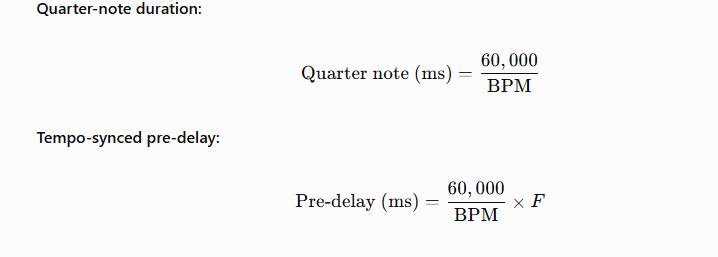
Here, (F) is the selected note duration expressed as a fraction of a quarter note. For example, an eighth note has a factor of (0.5), while a sixteenth note has a factor of (0.25).
Pre-Delay Calculation Example
Suppose your song is playing at 120 BPM.
- Quarter note: (60,000 \div 120 = 500) ms
- Eighth note: (500 \times 0.5 = 250) ms
- Sixteenth note: (500 \times 0.25 = 125) ms
- Thirty-second note: (500 \times 0.125 = 62.5) ms
These are mathematical note durations, not recommendations that every reverb should use those values. For practical mixing, you may want a shorter subdivision or a custom millisecond value, depending on the sound and arrangement.
What Is a Good Pre-Delay Setting?
There is no single pre-delay value that works for every mix. The following ranges are starting points for listening tests, not strict standards.
| Sound source | Starting range | What to listen for |
|---|---|---|
| Lead vocals | 30–60 ms | Clear words with a smooth reverb behind the voice |
| Drums and snare | 10–40 ms | A defined attack without an obviously detached reverb |
| Guitar and piano | 15–40 ms | Note definition balanced with ambience |
| Pads and ambient sounds | 0–20 ms | A blended, spacious texture |
| Spoken voice | 20–50 ms | Speech intelligibility and natural space |
These ranges can overlap, and a setting outside them may work better for a particular production. Compare the result in the full mix instead of relying only on the number.
For vocal-specific guidance, read our guide to reverb for vocals.
Pre-Delay vs. Reverb Decay Time
Pre-delay and decay time control different aspects of a reverb effect.
- Pre-delay controls when the reverb begins after the original sound.
- Decay time controls how long the reverb continues to fade.
- Delay generally creates distinct repetitions of a sound rather than controlling the onset of a reverb tail.
For example, you could use a 35 ms pre-delay with a 1.5-second decay. The first value controls the timing gap; the second describes the reverb’s decay duration. Increasing pre-delay does not automatically make the reverb tail longer.
Learn more in our guide to pre-delay vs. decay time, or use the Delay Calculator for separate delay-time calculations.
Should Pre-Delay Be Synchronized to BPM?
Tempo synchronization is useful when you want the reverb’s onset to relate to the rhythm of a track. Calculating note durations gives you a repeatable timing reference, particularly in productions where the reverb needs to sit comfortably within a rhythmic arrangement.
However, pre-delay does not always need to follow a musical subdivision. A custom value may sound more natural if the source needs a particular amount of separation. Use the BPM result as a starting point, then compare different settings while the whole arrangement is playing.
If you are configuring several time-based effects, our Delay Time Guide explains how musical timing relates to delay settings.
Common Pre-Delay Problems
The reverb makes vocals sound muddy
Try increasing pre-delay in small steps while keeping the reverb level and decay time consistent. This may help the dry vocal remain distinct before the reverb becomes prominent. If the mix still sounds muddy, also check the decay length, reverb level, and frequency balance.
The reverb sounds detached from the original sound
The pre-delay may be too long for the source or arrangement. Reduce it gradually until the reverb feels connected to the performance without obscuring the initial attack.
The result seems too long for the tempo
Check whether you selected the intended note value. Remember that the calculator reports the duration of the selected rhythmic subdivision; it does not decide whether that duration is musically appropriate for your reverb.
The calculated value does not sound right
A mathematically correct time is not automatically the best creative setting. The sound source, tempo, arrangement density, reverb algorithm, and wet/dry balance all affect the result.
Frequently Asked Questions
What does a pre-delay calculator do?
A pre-delay calculator converts a tempo and selected note value into milliseconds, or helps you work with a custom time. The result provides a timing reference for setting the pre-delay control in a reverb plugin.
How do I calculate pre-delay from BPM?
Divide 60,000 by the BPM to calculate the duration of a quarter note in milliseconds. Multiply that result by the chosen note’s duration relative to a quarter note.
Is pre-delay measured in milliseconds?
Yes. Reverb plugins commonly display pre-delay in milliseconds (ms), although the available controls vary between plugins.
Does longer pre-delay make reverb last longer?
No. Pre-delay changes when the reverb begins. Decay time controls how long the reverb continues to fade.
Should I use the same pre-delay for every instrument?
No. Vocals, drums, guitars, piano, and ambient sounds have different transient and clarity requirements. Start with a suitable range, then adjust each source in the context of the mix.
Can I use pre-delay without syncing it to BPM?
Yes. A custom millisecond value is often appropriate when you are shaping the relationship between a sound’s attack and its reverb. Tempo synchronization is optional.
Calculate Your Pre-Delay
Use the calculator above to find a tempo-based or custom pre-delay value in milliseconds. Treat the result as a starting point, listen to how the reverb interacts with the original sound, and adjust it to suit your mix.
For more tools and practical guidance, explore the Reverb Calculator homepage, the Mixing Reverb guide, and the What Is Pre-Delay guide.